
The ultimate guide to LinkedIn UK optimisation in 2026
LinkedIn is the most popular professional network in the world, with – at the time of writing – 1.3billion users globally. As well as helping you to build a professional network, LinkedIn UK is also a great tool for finding jobs, developing your career and enhancing your online presence. It’s the place to be for job seekers!
But how can you use LinkedIn UK to your best advantage? There’s plenty that you can be doing to optimise your online profile – here are some top tips from Word Dragon.
LinkedIn vs CVs
LinkedIn UK is very different to a CV, but both can (and should!) be used as part of your job search toolkit. This table summarises the main differences:
| CV | |
|---|---|
| An online platform | A Word or PDF document |
| Only one version of your profile available | Can be tailored to specific roles |
| Interactive – users can like, comment on, and share your posts and you can do the same. | A static, read-only version of your career accessible only to those you send it to. |
| Other users can add endorsements and references to your profile | References need to be requested separately |
| Requires a photo to maximise engagement | Photos are not recommended |
| Can include extensive detail | Usually limited to around 2 pages |
| Combines an online profile with a job board, messaging functions, news feed and networking opportunities | Only used to apply for jobs |
| Recruiters can find your profile by conducting searches | Recruiters only see your CV if you send it to them |
| Your profile can be enhanced with posts, featured media, and additional information | Fairly rigid in terms of structure and content |
Build your LinkedIn profile
First things first! You’ll need to get your profile up to scratch if you want to make the most of this platform. It’s quite self-explanatory, but here are some important tips that you should bear in mind:
- Add a profile photo. They’re not advised on CVs, but profiles with photos get 21 times more views and 9 times more connection requests. Make sure that your photo is a headshot, with professional attire and a plain background.
- Add a banner image, to dress your profile, and keep it relevant to your career. You could add a photo, stock image, or an image you've created yourself – all are better than leaving it blank!
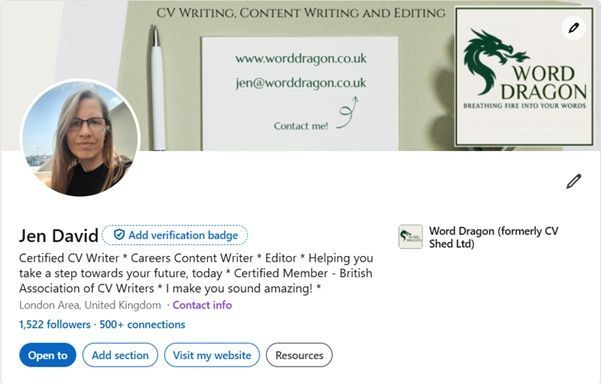
- Change your headline and URL. LinkedIn will automatically set your headline to your current job title and set your URL to a random sequence of numbers. Attract more views by changing them to something more memorable. Examples could include what you do, the industry you work in, how you add value, what drives you, who you help and so on.
Your header should be coming together now, and look something like this:
Completing your LinkedIn UK profile
The more complete your profile, the more recruiters, hiring managers and connections can find out about you and the more likely you are to show up in search results. This guidance explains how to fill out the main sections of the profile.
The headline
Rather than leaving your headline as the default setting, it's possible to change it to something more interesting and informative. Apart from your name and photo, this is the only information that shows up in initial search results, so you need something click-worthy to encourage people to open your full profile.
You're limited to 220 characters, with only the first 64 showing when you create posts. Take a look at some of these examples:
- Certified CV Writer * Careers Content Writer * Editor * Helping you take a step towards your future, today * Certified Member - British Association of CV Writers * I make you sound amazing! *
- Talent Acquisition Leader | Building and Scaling Global Recruiting Functions for Fortune 500 and High-Growth Organizations
- Electrical Engineer | PhD Scholar | Electric Vehicles | Optimisation | Smart Grids | Renewable Energy Integration | Non-Linear Control Systems
- Freelance Brand & Graphic Designer | Strategy-led branding & websites | Supporting growing businesses and busy teams | Ocean lover
- Bringing the personal touch back to marketing! I’m here to do things differently. I don’t offer a ‘one size fits all’ approach.
The About section
Apart from your name and headline, this is the first thing that visitors to your profile will see. Annoyingly, LinkedIn UK only displays the first three lines initially, then the reader has to actively click "more" to read the rest. That means the first three lines must summarise what you do and be interesting enough to make the reader click to read the rest.
This section acts like the Profile section of your CV. It serves as your introduction to the reader and should focus on your career, rather than your love of cats / abseiling / playing the harmonica.
You could include:
- What you do
- Any specialisms or expertise
- Who you help
- The scope of your work
- Why you do what you do
- Examples of your biggest achievements
- Names of key clients
Try to let some of your personality shine through here – unlike a CV, LinkedIn UK is about human connection. Don't be tempted to use AI to write this, as it will sound generic and inauthentic.
Write in short paragraphs, with a view to making the information easy to read on a laptop or mobile screen, and don't include information that may be commercially sensitive.
The Experience section
In this section, you list your current and previous roles, much as you would on your CV. You can write in full sentences, rather than bullet points, if you prefer, but avoid long paragraphs.
There's a 2,000-character limit per job, which usually gives you the opportunity to include more information than you would on a CV. Focus this writing on the value you've added in each role. Make sure that what you're writing shows how you'd be a great fit in your intended next position, keeping everything you write focused on your target.
The skills section
You can list up to 100 skills. There's no obligation to use all 100, but the more you add, the more people can endorse and the more searchable keywords your profile will contain.
Unless you're at a very early stage of your career, try to focus on hard skills relevant to your job, rather than soft skills. People are more likely to search for "SEO" or "content writing" than "communication" or "teamwork".
Those are the main sections to complete on a LinkedIn UK profile, but you should aim to complete as many additional sections as possible.
Get networking
Next up, you need to start building your network. You can begin with current colleagues, then add former colleagues, managers, suppliers, clients, friends and other contacts… the list is endless.
You can also connect with people you don’t know – LinkedIn etiquette suggests that you add a personal note to your connection request in that case, explaining why you want to connect. This is a great way to extend your network of professionals in your industry. Continue adding to your network throughout your career. Contacts are invaluable when you’re job hunting!
Follow companies and individuals
Most companies have a profile page on LinkedIn. Follow leading businesses in your industry, as well as companies you’d like to work for. Their news will appear in your feed, so you'll be fully informed of news and developments both in your industry and in your target companies. When interview time comes round, you’ll be ahead of the game.
You can also follow individuals, from giants such as Barack Obama to random people posting on topics you’re interested in.
Join groups
Whatever you do, LinkedIn has a group for that. They’re great places for meeting like-minded professionals, staying abreast of industry developments, and getting – and offering – support.
Engage
LinkedIn UK is a social network, so get involved! Liking, commenting on and sharing posts will boost your visibility. Even better, write your own posts and engage with the comments. These activities will help you to remain at the forefront of people’s minds so that, when they hear of an opportunity that might suit you, you’ll be the first to know.
With well-considered posts and comments, you can position yourself as an expert in your field.
Request endorsements and recommendations
Anyone you're connected with can endorse your skills or add a recommendation. An endorsement is a simple confirmation that you have the skill you've listed. A recommendation is like a traditional reference, except you can choose whether or not to add it to your profile and, if so, it's publicly visible. Ask connections you've worked with to add these to your profile for extra credibility.
Look for jobs on LinkedIn UK
LinkedIn is a job board in its own right, so you can use the search functions to find roles that may be of interest. You can even set alerts, so that you’re informed of jobs that meet your search criteria as soon as they’re posted.
It’s often possible to apply directly through LinkedIn, but if you can find the role advertised on the employer’s website you should apply directly. If your profile is well optimised, you may even find yourself being approached by recruiters without having to lift a finger!
Example LinkedIn UK profiles
If you're not sure what a good LinkedIn profile looks like, take a look at these. They're all quite different but all work well:
- Here's mine!
- Check out Ryan Reynold's page
- Amy Miller shares good job search advice from a US recruiter perspective
Take a look at the profiles of leaders in your particular sector to see what's working, what’s not, and what inspiration you can draw from them.
Common LinkedIn mistakes – and how to avoid them
Any social media platform comes with unwritten rules. Rather than stumbling through and learning the hard way, check out these common LinkedIn mistakes and avoid them yourself.
Set and forget
The most common LinkedIn mistake, but also one of the easiest to make, is setting up your profile and not actively using it. You'll get most benefit from LinkedIn if you log in regularly – daily or weekly – and spend time interacting with posts, creating your own, and reaching out to build your network. When the time comes to start looking for work, you'll already have your audience there ready and warmed up.
Leaving key sections blank
A partially complete profile may work for famous people with a known background and track record, but the rest of us need all the help we can get. Ensure you complete as many sections of your profile as possible, as fully as possible. Aside from the standard About, Experience, Skills, and Education sections, you can add others using the "add section" button near the top – complete as many as possible, with information relevant to your intended next steps.
Unprofessionalism
A profile photo of you, beer in hand and enjoying a night out, may bring back happy memories and show you’re a fun person, but LinkedIn UK is a professional platform. Similarly with the posts you create, keep them professional and remember that your future boss may be looking. Stick to Instagram or Tik Tok for the fun posts and keep LinkedIn purely for business.
Self-promotion
Yes, LinkedIn is partly a self-promotion tool, but there's no need to be icky about it. If you're jumping into the comments on other people's posts to shout about your latest product / promotion / award, wind your neck in. Make your own posts if you have something worthwhile to share and keep your comments on others' relevant to the discussion.
Unhelpful privacy settings
If you want to be found by recruiters and potential contacts, they need to be able to find and read your full profile. It's worth checking your privacy settings to ensure they're at a level that works for you, whilst also enabling your profile to be found by the right people.
Lack of clarity
Jack of all trades and master of none, as they say. Don't try to cover every element of every aspect of your life in your LinkedIn profile. Write with your target role in mind, so that your readers are clear on what you offer and where your value lies. There's skill in getting just the right level of detail in your profile, so it's not too vague and not too detailed.
Hiding in plain sight
When you've written your profile, make sure that someone recruiting for your target roles will actually be able to find you. That means including plenty of keywords (for example, project management if you're a project manager), checking your spellings (there are literally thousands of people on LinkedIn UK describing themselves as Mangers rather than Managers), and avoiding clichés (such as enthusiastic and hardworking).
Duplicating your CV
Copy-and-pasting your CV into your LinkedIn profile is pretty uninspiring. A recruiter may well visit your LinkedIn profile after reviewing your CV so, rather than repeating the same information, use the flexibility of LinkedIn to add some extra details and explanations.
An outdated profile
You may be writing posts and interacting with others, but if your profile is out of date you're not doing yourself any favours. Review it regularly – not just when you get a new job – to ensure your latest career details are added. Whether it's a new certificate, a successful project, or some volunteering, it shows you're active on the platform and gives recruiters and hiring managers the information they need.
AI-generated writing
An increasing number of people are using AI to write their About section and even their posts. 99% of the time it sticks out like a sore thumb. People visiting your profile want to find out about you as a person and a professional, not to read a polished but robotic narrative that has no substance. A less generic, more authentic, profile is what you should be aiming for.
LinkedIn FAQs
How much does it cost to join LinkedIn?
LinkedIn UK is free to join and use for as long as you like. The free plan is suitable for most people, including job seekers. The LinkedIn Premium plan comes at a cost and includes access to LinkedIn learning courses and additional functionality such as extra messaging and insights, but most people get by just fine without it.
Can I remain anonymous on LinkedIn UK?
You can set your privacy settings at various levels, including completely anonymous. Go to Settings then Visibility to adjust, bearing in mind that part of the reason for having a LinkedIn presence is to build your network and be found by recruiters.
Can people see if you view their LinkedIn profile?
Other users can see that someone has viewed their profile. Whether they can see that it's you depends on your privacy settings.
What are the pros and cons of LinkedIn?
LinkedIn can raise your professional profile, give you access to jobs and help build your network. On the other hand, your information is in the public domain, you may find yourself receiving spammy or scammy messages… and LinkedIn can sometimes be a bit cringe!
Use LinkedIn UK to move your career forward
With up to 85% of jobs being filled through some form of networking, using LinkedIn UK is a smart career move. Best of all, it’s free (unless you want the really fancy option). Are you ready to start using LinkedIn to achieve your career goals?
Word Dragon writes optimised LinkedIn profiles that showcase your experience, skills and achievements to get you noticed by recruiters. Get in touch to give your profile the boost it needs!
Updated 2026

Author bio: Jen is a UK-based careers writer with over 15 years' experience in writing CVs for UK professionals. She is a certified member of the British Association of CV Writers, with a Master's degree in English, and has written and edited articles for international businesses.
Share this Blog
More from my Blog..